Jekyll Theme ACG Guide
My English is poor. In the event of any discrepancy, the Simplified Chinese post shall prevail.
Quick start
Prerequisites
- ruby 2.7
- bundle 2.2
- jekyll 4.2
Manual Installation
-
Fork the repo jekyll-theme-acg-minimal.
-
Run
bundle update && bundle exec jekyll serve -oto build the site and make it available on a local server.
Automatic deployment
Whenever the main branch has a push operation, GitHub Actions will execute the content of the .github/workflows/deploy.yml file and publish the content of the site on the github-pages branch.
Don’t forget to configure the settings of the repository.
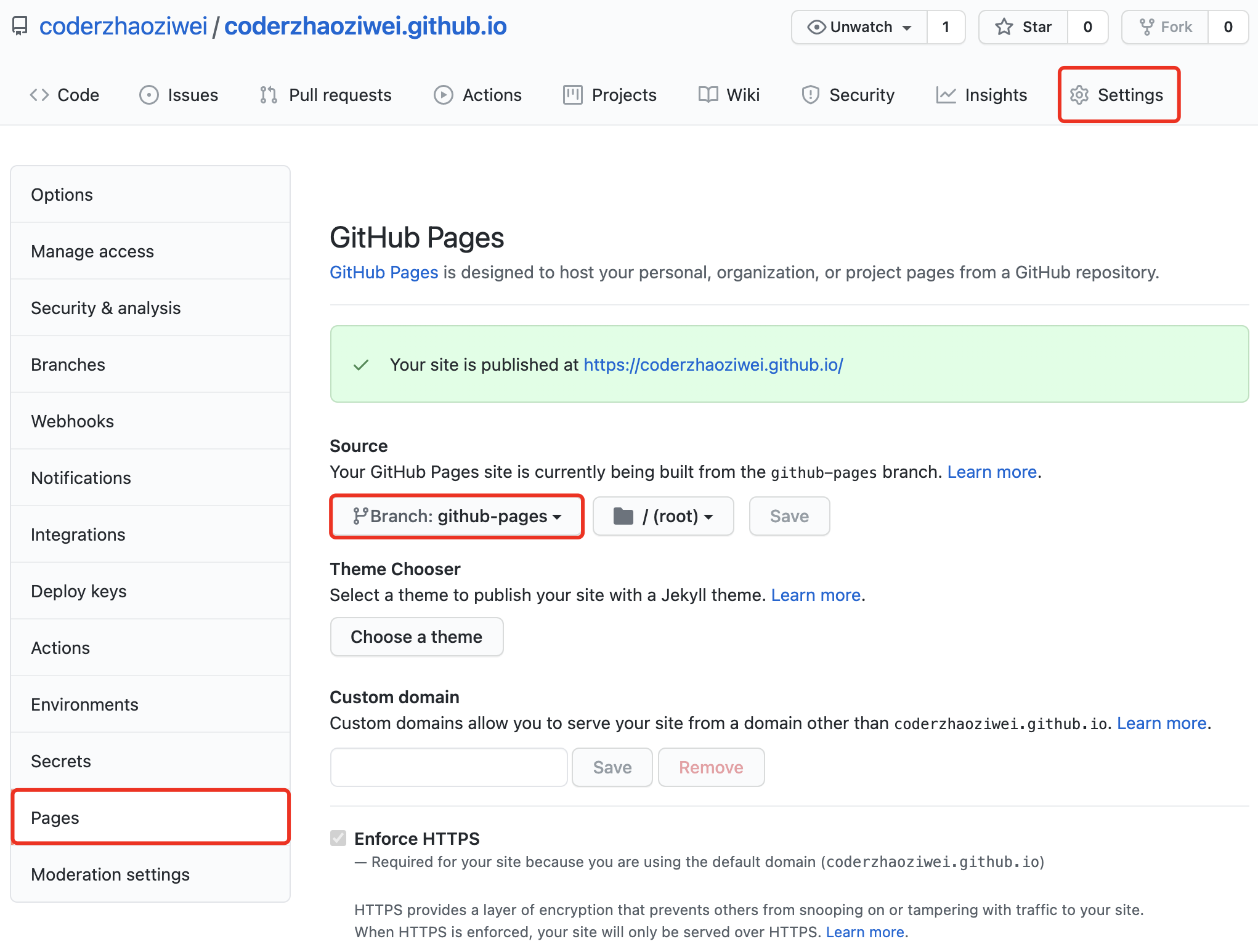
Global configuration
The global configuration is stored in the configuration file _config.yml.
url:                    # address, such as `https://coderzhaoziwei.github.io`
baseurl:                # base path, default value is `/`
title:                  # title
description:            # description
author:                 # author name, currently only used to display in the footer
lang:                   # language, default value is `en-US`

theme: jekyll-theme-acg # theme

# theme attributes
acg:
  color:                # theme color, default value is `red`
  background:           # theme background, default value is `https://cdn.jsdelivr.net/gh/coderzhaoziwei/jekyll-theme-acg/assets/images/pixiv86925095.png`
  categories:
    label:              # default value is `Categories`
    description:
  tags:
    label:              # default value is `Tags`
    description:
  about:
    label:              # default value is `About`
    description:
  friends:
    label:              # default value is `Friends`
    description:
  error:
    label:              # title of `404.html`, default value is `404`
    description:        # default value is `Page not found.`

# excluded files
exclude: [
  "LICENSE",
  "README.md",
  "package.json",
]

# The necessary configuration of Jekyll Theme ACG
# If you don't understand the meaning of the following values, please don't change them at will.
defaults:
- scope:
    path: ""
  values:
    layout: page
- scope:
    path: "index.html"
  values:
    layout: page
    type: home
- scope:
    path: ""
    type: posts
  values:
    layout: page
    permalink: /posts/:title
    type: post
baseurl
Only when the site path is a sub-path under the domain name, it must be set.
For example: the site path of https://coderzhaoziwei.github.io/jekyll-theme-acg-minimal is a sub-path under the domain name. Only when baseurl: /jekyll-theme-acg-minimal is configured can it be used normally.
acg.color
The theme color can be selected from the following values:
- red
- blue
- green
- yellow
- pink
- purple
- gray
acg.background
The background can be an external link or the path of the site.
For example: background: /assets/bg/example.png
Post configuration
Posts are stored in the _posts folder, and the file name is recommended to follow the format of YYYY-MM-DD-title.md.
Each post must use Front Matter in YAML format at the beginning. Front Matter will recognize the file as a special file by Jekyll, and the content of Front Matter will be bound to the unique attributes of this article.
---
title:
description:
categories: []
tags: []
lang:
color:
background:
pin:
---
title (required)
The title of the post.
If the title value is not manually set, then Jekyll will use the file name to generate a title value. If the file name of a post is 2021-06-01-show-rendering-cn.md, then the automatically generated title is Show Rendering Cn, which should usually be avoided.
description
Brief description of the post.
If the description value is not manually set, Jekyll will automatically extract the beginning of the post to generate a description value.
categories
Categories of posts. It is recommended to use the form of an array.
---
categories: ["Category One", "Category Two", "Category Three"] # Spaces can be used in the category name

# or
categories: CategoryOne CategoryTwo CategoryThree # Space is used to separate
---
tags
The tags of the post. The rules are the same as for categories.
color
The theme color of the post.
If the value of color is not set manually, Jekyll will read the value of color in the global configuration _config.yml.
background
The background image of the post.
If the value of background is not manually set, Jekyll will read the value of background in the global configuration _config.yml.
pin
Top article option.
If the value of pin is not true, then this post will not be at the top of the homepage.